


Pattern Editor
GEO5 programs include soil sample catalogs based on various standards and norms. The Pattern Editor is used to create any custom soil sample pattern—for example, according to company conventions. In such cases, it is recommended to start from a pattern that is as similar as possible to the desired result.
A hatch consists of Layers, and each layer is composed of Lines. A line can be either solid or "custom". A custom line is built from individual elements—for example, circles, points, polygons, spaces, etc.
A preview of the line is shown in the lower part of the window, while the left part displays a preview of the currently selected layer or of the complete resulting hatch.
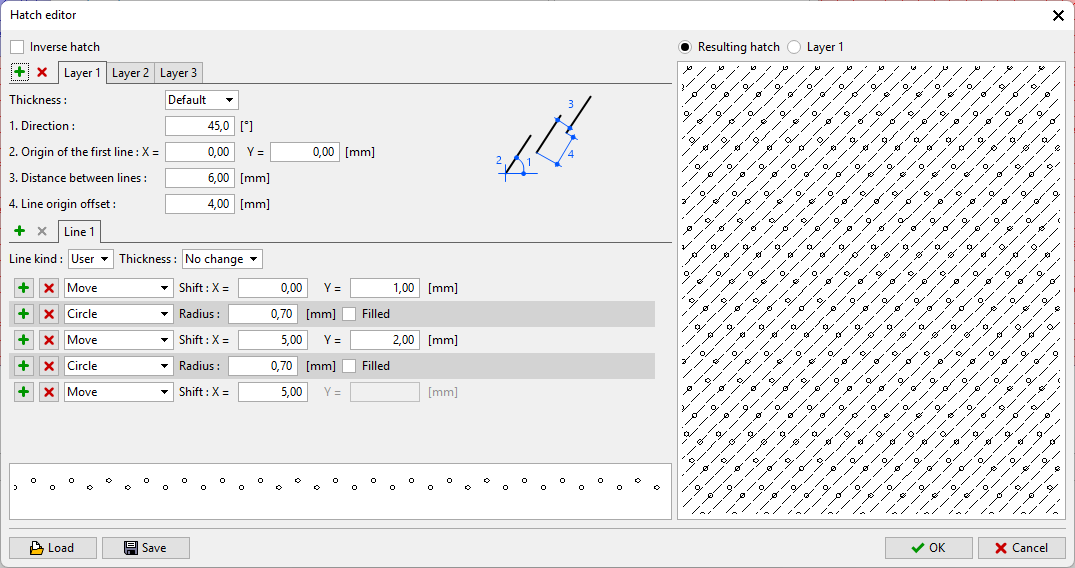 Pattern Editor
The created pattern can be saved to a file (.ffd format) and later loaded from it.