


Подбор размеров
В рамке «Подбор размеров» программа принимает нагрузки рассчитанные в рамке «Расчёт». Выбирают тип расчёта:
- вертикальное направление
- расчёт внутренних сил на стяжке - в горизонтальном разрезе
Далее задают № расчёта нагрузки и можно и огибающую всех выполненных расчётов.
По одной задаче можно выполнить несколько расчётов. Максимальные значения рассчитанных внутренних сил отображаются в выходном окне. Кнопка «Подробно» открывает диалоговое окно с подробной выпиской результатов подбора размеров.
При расчёте в вертикальном направлении программа позволяет ещё и выбор рассматриваемого отрезка (при условии, что была задана сосредоточенная равномерно распределённая пригрузка), или может непосредственно посчитать огибающую внутренних сил по всем отрезкам.
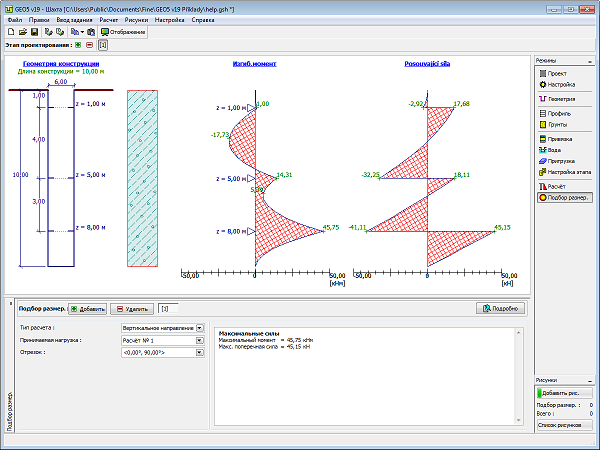 Рамка «Подбор размеров» - вертикальное направление
При расчётах в горизонтальном направлении (расчёт внутренних сил на стяжке или на 1 пог.м глубины конструкции) задают модуль реакции подстилающего слоя грунта на данной глубине.
Программа позволяет отобразить нагрузку, изгибающий момент, нормальные силы и сдвигающие силы - стиль отрисовки выбирают в поле «Отображение». Выбор «Максимальные значения» прячет все значения величин кроме максимальных.
На рисунке толстой линией отрисован фрагмент контура конструкции - это часть шахты, деформация которой направлена в грунт. В этой части при расчёте конструкции подстилающий слой принимается полигональным методом.
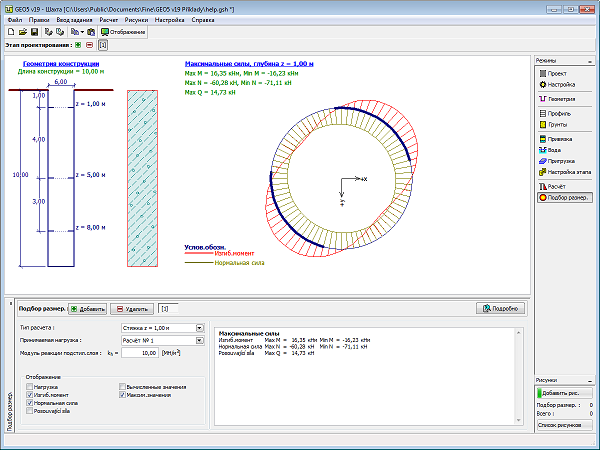 Рамка «Подбор размеров» - стяжка
Стиль рисунка можно менять в диалоговом окне «Настройка рисования».